17 NES BASIC PROGRAMMING GUIDE
Compiling NES BASIC Programs into Standalone NES ROMs
You can turn a numbered NES BASIC program into a downloadable .nes file. That file contains your program, its kept sprite artwork and the NES-native runtime that executes it. Open it as an ordinary game in a compatible NES emulator. The browser, your .bas source and a separate NES BASIC cartridge are not needed to play the exported game.
This chapter covers the browser compiler. It does not change the BASIC language in the earlier chapters. You still work with small integer programs, NES graphics, controller input and the same memory limits.
What compilation means here
A .bas file is readable numbered BASIC source. A .nes file is a cartridge image containing a NES header and 6502-family machine code and data. Compilation validates your source with the native tokenizer and grammar checker, stores the accepted token records and artwork, and packages them with a native BASIC runtime. The resulting interpreter runs on the NES CPU. This is not a renamed text file, and it is not a browser app inside a ROM.
Compilation does not turn every BASIC statement into separately optimized machine code. Your game keeps the interpreter's execution speed. It does not gain extra RAM or new commands. The browser does not run the submitted program to decide whether compilation succeeds. Errors that depend on values or input can still occur while the exported game runs.
Your first standalone ROM: Hello NES
Open the playground. Click the NES screen and enter these four lines, pressing Enter after each one. On a phone, Keyboard opens a text-entry field; use Send to NES for each line. You can also open the Hello NES source file with Open .bas file.
10 CLS
20 PRINT "HELLO NES!"
30 PRINT "MY FIRST NES ROM"
40 END
Type RUN and press Enter. The screen should show HELLO NES! and MY FIRST NES ROM. Keep a source backup with Download .bas. That backup lets you edit and recompile your program later; the exported game is a separate file.
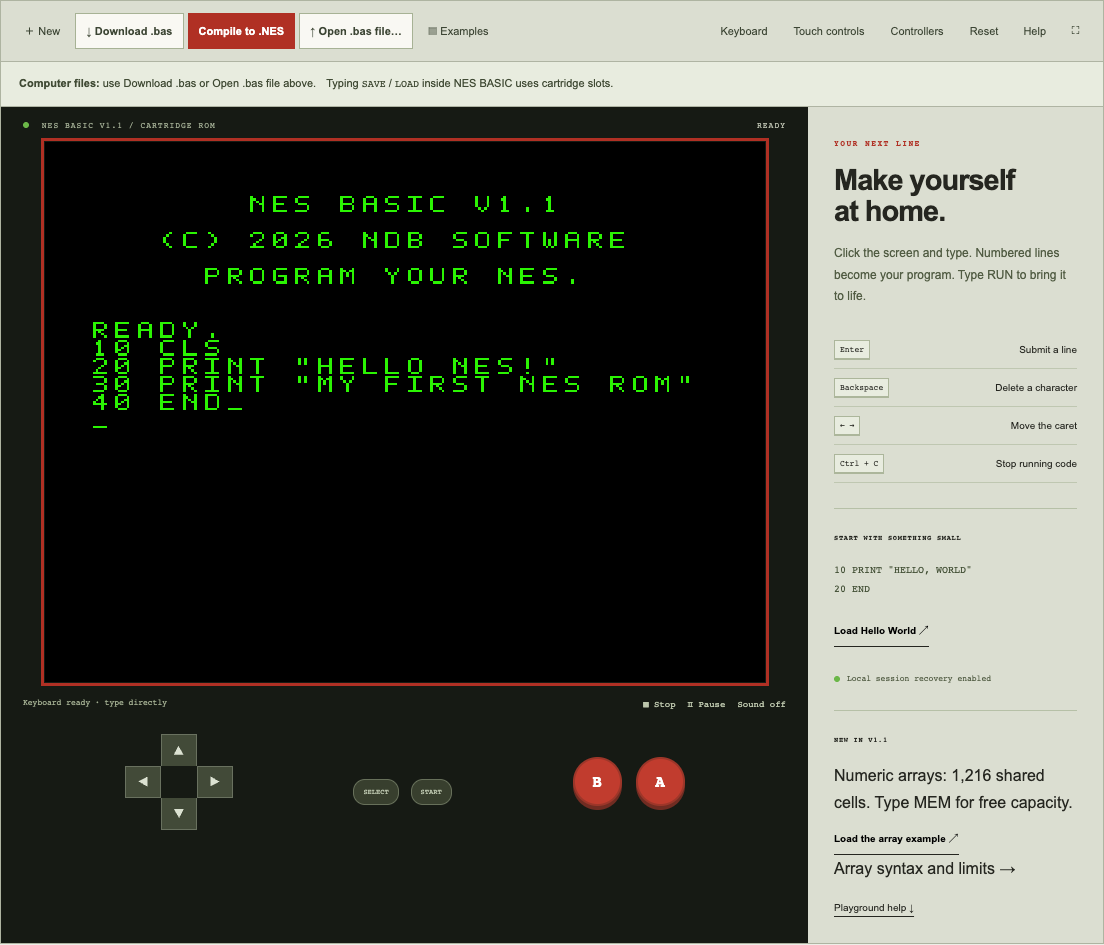
Click Compile to .NES beside Download .bas. A dialog asks for a name. Enter HELLO_NES; the .nes extension is supplied. The suggested name comes from an imported file or example when available. Spaces and unsafe filename characters are normalized, and the dialog shows the actual download name.
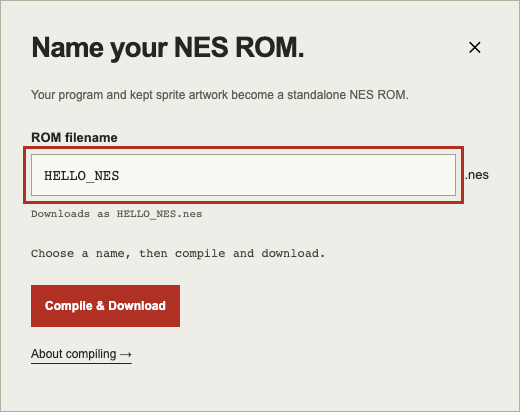
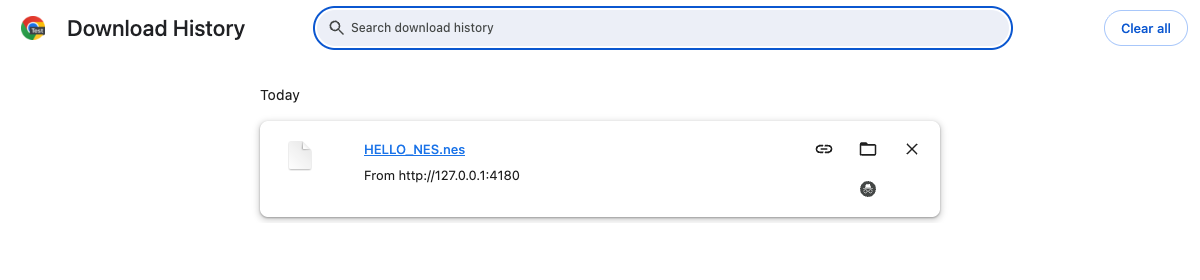
Choose Compile & Download. Progress and any source-line error appear in the dialog. Cancel compilation or close the dialog to stop the worker; your editor remains intact. On success, the browser starts downloading HELLO_NES.nes. Your browser decides whether to use its Downloads folder or ask where to save it. The current ROM is 131,088 bytes, including its header.
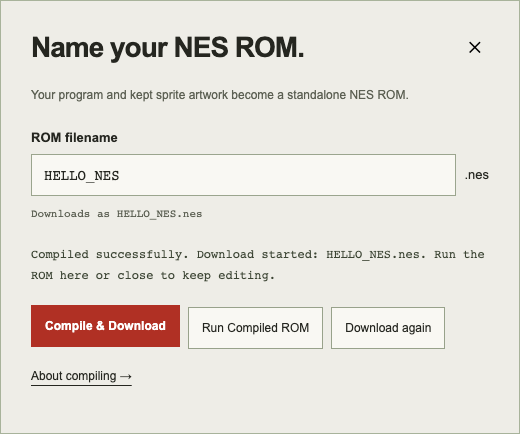
Choose Run Compiled ROM in the success dialog. The playground boots the actual exported bytes in a separate NES machine. Hello NES runs immediately; you do not type RUN in the exported game. END leaves the final screen visible. Restart ROM or Reset reboots that game. Stop freezes compiled playback. Return to Editor brings back your original source, artwork and six cartridge saves. Close the filename dialog to continue typing normally. If you edit source or artwork, compile again to update the ROM.
The four-line listing above has been compiled, downloaded from the actual playground and booted independently. You can compare your result with the tested Hello NES ROM.
Open the download in an independent emulator
Use a NES emulator that supports the cartridge configuration in the memory table below. In Mesen, choose File → Open and select HELLO_NES.nes. Open the ROM itself, not a .bas file, recovery snapshot or emulator save state. Reset or power-cycle the emulated cartridge: the greeting should appear again without loading source or an external .sav file.
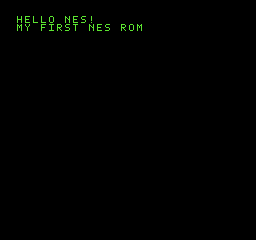
This screenshot is actual Mesen output from the downloaded tutorial ROM. The project has also tested exports through the FCEUmm core used by 8-Bit Impostor. Passing one emulator is useful evidence, but it does not establish physical flash-cartridge compatibility. See the Mesen loading instructions for its file-opening workflow; menus can vary by release.
In 8-Bit Impostor, save the downloaded .nes into Files or another location accessible to the app's ROM importer. Choose LOAD ROM, select the file, then open its library entry and choose PLAY CARTRIDGE. Import it as an ordinary NES game. Do not open the built-in NES BASIC programming environment and try to LOAD the file as BASIC source. The embedded runtime belongs to your exported game, so an older built-in programming cartridge does not supply that game's language implementation. Use the app's ordinary game controls, including its connected-controller settings. App menu labels depend on the installed version.
For a useful independence check, close the playground and start your game from its downloaded ROM. No web connection is required for ROM execution. Reopening the web editor itself still requires its site assets; this feature does not install an offline web application.
Artwork, controller input and sound
Kept artwork from EDITSPR is embedded at compilation: all 32 editable 8×8 patterns, IDs 8–39. Built-in sprite IDs 0–7 are already in the runtime. Finish with Keep or discard pending artwork changes before compiling. A plain .bas file contains source only, so import it into the session holding your desired art or recreate/LOAD the art before exporting. Native SAVE preserves source and art in the editor's cartridge slots.
During compiled playback, touch buttons, a connected gamepad and the saved keyboard controller mappings operate controller one. The default keyboard mapping is arrows for the D-pad, X for A, Z for B, Enter for Start and right Shift for Select. Your editor's saved typing/controller mode is not changed. An independent emulator uses its own input mappings. JOY(2) also exists in the runtime; the web player's controls expose player one.
Text INPUT uses the cartridge's controller-operated NES keyboard. Use the D-pad to select characters, A to type, B to delete and Start to submit. The compiled game does not depend on the browser's source-typing bridge. Enable Sound with a click in the playground. In an independent emulator, check its audio settings and the device's output volume. BEEP and SOUND remain native NES audio, with the same timing and channel limits.
Command compatibility reference
All 48 existing program-level tokens can be exported. Thirteen prompt/editor tokens cannot be placed in numbered game code. This table covers all 61 keyword tokens; full syntax and examples remain in the searchable command reference.
| Keyword | Standalone export | Native behavior and limits |
|---|---|---|
| ABS | Supported in programs | Signed 16-bit; ABS(-32768) overflows. |
| ASC | Supported in programs | First byte of nonempty string, not a browser key code. |
| BEEP | Supported in programs | Pulse 1 note 69 for 12 native frames; test APU output. |
| CAT | Editor only; rejected in numbered code | FILES alias; editor directory, not game state. |
| CHR$ | Supported in programs | One byte 0–255; glyph visibility differs from byte validity. |
| CLEAR | Supported in programs | Resets values, arrays, control frames, sound, sprites and seed; retains source/art. |
| CLS | Supported in programs | Native terminal/canvas clear; preserve native mode behavior. |
| COLOR | Supported in programs | Shared foreground/background palette indices 0–63 excluding 13/29/45/61; sprite palette fixed. |
| DEMOS | Editor only; rejected in numbered code | Editor library; not game execution. |
| DIM | Supported in programs | A–Z numeric arrays, one/two dimensions, inclusive bounds, 1,216 shared cells; needs 32 KiB banked RAM layout. |
| EDITSPR | Editor only; rejected in numbered code | Embed 512 bytes of kept art at compile time instead; 32 patterns IDs 8–39. |
| END | Supported in programs | Finish safely, stop audio and retain final game scene. |
| ERASE | Editor only; rejected in numbered code | Editor project deletion; no persistent game-state API. |
| FILES | Editor only; rejected in numbered code | Six editor project slots; not compiled game saves. |
| FILL | Supported in programs | SCREEN 1, four-connected canvas fill, 64-seed complexity bound. |
| FOR | Supported in programs | Integer loops, negative/zero-trip support, eight shared FOR/GOSUB frames. |
| GOSUB | Supported in programs | Literal existing line, eight shared frames; preserve colon return position. |
| GOTO | Supported in programs | Literal existing line 1–65535; compiler validates references. |
| HELP | Editor only; rejected in numbered code | Native editor help; link compiler help in browser/guide instead. |
| HIDE | Supported in programs | Sprite slot 0–63; native OAM update. |
| IF | Supported in programs | Nonzero numeric condition; THEN literal line or inline statement; no ELSE; false skips whole line remainder. |
| INKEY$ | Supported in programs | No parentheses; eight-event FIFO; standard controller edges 128–135 in RUN, optional keyboard peripheral. |
| INPUT | Supported in programs | One scalar/string/array cell; retain controller-operated native text keyboard and retry behavior. |
| INT | Supported in programs | Integer identity; no floating point. |
| JOY | Supported in programs | Port 1/2 held-button mask; port 2 unavailable after optional keyboard handshake until reset. Avoid automatic handshake in compiled play. |
| KILL | Editor only; rejected in numbered code | ERASE alias; not game persistence. |
| LEFT$ | Supported in programs | Nonnegative byte count clamps; shared string storage limits. |
| LEN | Supported in programs | Byte length, including NUL, not Unicode characters. |
| LET | Supported in programs | Optional LET, A–Z/A$–Z$, typed values and indexed numeric assignment; no long identifiers. |
| LINE | Supported in programs | SCREEN 1, inclusive endpoints and clipping; long segments may take many frames. |
| LIST | Editor only; rejected in numbered code | Editor listing and paging, not program bytecode. |
| LOAD | Editor only; rejected in numbered code | Restores editor source/art; not runtime game progress. |
| LOADDEMO | Editor only; rejected in numbered code | Editor library replacement. |
| LOCATE | Supported in programs | Columns 0–27, rows 0–21; restores text from graphics. |
| MEM | Supported in programs | Native remaining program/line/array/string diagnostics, not general host memory. |
| MID$ | Supported in programs | One-based start, optional nonnegative count; byte strings. |
| MOVE | Supported in programs | SCREEN 1, visible slot, x 0–255/y 1–239; native sprite bounds. |
| NEW | Editor only; rejected in numbered code | Editor operation, not embedded program statement. |
| NEXT | Supported in programs | Explicit matching FOR variable; native overflow/stack errors retained. |
| Supported in programs | Native text, typed expressions, semicolon/comma separators; text paging uses controller; exits graphics. | |
| PSET | Supported in programs | SCREEN 1, 128×64 one-bit canvas; clipped points no-op. |
| RECT | Supported in programs | SCREEN 1, opposite corners, outline, not filled width/height rectangle. |
| REM | Supported in programs | Rest of line literal; compiler must not treat keywords/colons in comments as instructions. |
| RETURN | Supported in programs | Matching GOSUB frame, native line/colon return semantics. |
| RIGHT$ | Supported in programs | Nonnegative byte count clamps; string memory checks. |
| RND | Supported in programs | Deterministic 16-bit LFSR, returns 0..N-1 for N 1–32767; RUN resets seed; no RANDOMIZE. |
| RUN | Editor only; rejected in numbered code | Export boot calls native execution entry automatically; named editor RUN not a game statement. |
| SAVE | Editor only; rejected in numbered code | Source/art only; no scores/variables persistence promise. Header RAM requirement remains. |
| SCREEN | Supported in programs | 0=text, 1=graphics; native clear/font/palette/sprite transition behavior. |
| SGN | Supported in programs | Signed integer result -1/0/1. |
| SOUND | Supported in programs | Channels 1–4; notes 33–96 or noise 0–15, durations 0–32767 native frames; NTSC; no DMC. |
| SPRCOL | Supported in programs | Visible unclipped 8×8 box overlap, not pixel collision; edge touching false. |
| SPRITE | Supported in programs | SCREEN 1, 64 slots, 8 per scanline, art 0–39; embed editable art alongside source. |
| STEP | Supported in programs | Nonzero integer step; default 1; not a standalone command. |
| STOP | Supported in programs | Termination like END; no CONT; preserve final frame. |
| STR$ | Supported in programs | Signed decimal integer string, no positive leading space; string arena limits. |
| THEN | Supported in programs | Literal target or inline statement; validate references even in untaken branches. |
| TILE | Supported in programs | SCREEN 1, 32×30 tile positions, pattern 0–255; native shared patterns, no per-call palette. |
| TO | Supported in programs | Inclusive loop limit; not a standalone command. |
| VAL | Supported in programs | Strict whole signed decimal string, optional surrounding spaces, -32768..32767; errors on garbage. |
| WAIT | Supported in programs | 0–32767 native frames; pause freezes emulation; statement work takes additional time. |
Normal numeric/string assignments, arithmetic and documented comparisons also work. ELSE, WHILE, DATA/READ/RESTORE, long identifiers, floating point, string arrays and arbitrary machine-code access have not been added. TO, STEP and THEN are grammar components used in the documented statements, not independent executable commands.
Memory and cartridge limits
| Resource | Export limit or requirement |
|---|---|
| Numbered program | Up to 128 lines and 3,072 token-record bytes |
| Physical source line | Up to 95 printable ASCII characters |
| BASIC line numbers | 1–65535; branch targets must name existing literal lines |
| Numeric values | Signed 16-bit integers, −32768 through 32767 |
| Numeric arrays | 26 names; one or two dimensions; 1,216 shared cells |
| Strings | 26 variables; 63 bytes per stored value; 256-byte shared string pool |
| Control stack | Eight shared FOR/GOSUB frames |
| Graphics | 128×64 one-bit canvas; existing native color limits |
| Sprites | 64 slots; up to eight per NES scanline; existing native priorities |
| Kept custom artwork | 512 bytes: 32 patterns, IDs 8–39 |
| ROM file | NES 2.0, mapper 1/submapper 0, SXROM-compatible MMC1; 131,088 bytes |
| Cartridge memory | 128 KiB PRG ROM, 8 KiB CHR RAM, 32 KiB banked PRG RAM/NVRAM |
| Video target | NTSC; PAL timing and hardware acceptance are not established |
A large amount of physical RAM on a flash cartridge is not enough by itself. The emulator or cartridge firmware must expose the exact banked memory layout and interpret the NES 2.0 header correctly. A generic mapper-1 board with only 8 KiB of work RAM is insufficient. Keep the generated header intact.
Compilation errors and runtime errors
Finish submitting the current line before compiling. The compiler also blocks unsubmitted text in the Keyboard field, a previously rejected numbered edit, uncommitted sprite work, an active cartridge operation and unfinished INPUT. These checks prevent accidentally exporting an older listing or partial art. An empty program must be given numbered lines first.
If a program branches to a missing line, fix the indicated source line and compile again. Literal GOTO, GOSUB and THEN targets are checked even in a branch that was not taken during your editor test. Unsupported editor statements in numbered code are rejected. Cancelled, timed-out or failed compilations do not replace your source or produce a successful new ROM.
A successful compile checks format and static syntax; it does not prove every execution path safe. Division by zero, overflow, out-of-range array subscripts, string-pool exhaustion and a full control stack can still fail at runtime. The playground shows the native error and BASIC line when available. Return to Editor, reproduce the failure with a small input, correct it, then recompile. See errors and recovery for the native messages.
For a game, test reset, repeated play, controller input, text INPUT, sprites, collisions, sound and every branch you can reach. Try the actual download in another compatible emulator, using fresh game RAM instead of a saved state. A program that works only after loading a previous editor snapshot is not a successful standalone test.
Running Your NES BASIC Programs on a Real Nintendo
Physical NES and flash-cartridge testing is still pending. This is a preparation and test procedure, not certification of a cartridge model or firmware version. Use your own NES or compatible console and hardware that explicitly supports the mapper, RAM banks and NES 2.0 format listed above.
First compile Hello NES and confirm the downloaded file boots independently in an emulator. Keep the known-working original ROM and its source backup. Check the flash cartridge maker's current manual for its console connector, SD-card preparation, firmware, mapper library and safe shutdown procedure. Do not buy hardware solely on the assumption that “supports MMC1” guarantees this export's SXROM memory configuration.
With the console powered off, prepare the card using the manufacturer's instructions and copy HELLO_NES.nes to a normal ROM folder. Eject the card safely, insert the card and flash cartridge, then power on. Select the ROM in the cartridge menu and inspect its ROM information if that menu provides it. Confirm mapper 1 and the full 32 KiB RAM requirement before treating the hardware as a valid test target. Launch the file as a game.
For example, the EverDrive N8 Pro manual describes ROM Info fields for mapper, memory and mapper support, plus a Start Game action. Those menu facilities help inspect a candidate configuration; they do not establish that this exact NES BASIC ROM has passed on that device. Follow the manual for your particular hardware revision and firmware.
The greeting should appear without an editor, keyboard, source injection or preloaded save file. Reset the console and verify that it starts again. Then test a small controller program, graphics and audio. Record the console, video region, cartridge model, firmware and ROM hash with the results. Stop and investigate a black screen, wrong header interpretation or missing RAM; do not work around it by stripping the NES 2.0 header or claiming a pass from an emulator instead. Physical validation belongs to the hardware milestone.
Saving and sharing a compiled game
Persistent game-state or high-score saving is not implemented. The ROM's NVRAM metadata describes the cartridge hardware; it does not provide a BASIC game-save API. SAVE/LOAD remain editor source-and-art commands and are rejected inside numbered game code. Exporting does not turn the editor's six project slots into game slots. Reset starts the exported program afresh.
An emulator or flash cartridge may offer its own save states. Those are host features with their own compatibility rules; they are not portable source backups or an implemented in-game save system. Keep .bas source, artwork backups and corresponding runtime sources separately from test save states.
The embedded native runtime retains GPL-2.0-or-later licensing. JSNES's Apache-2.0 browser emulator is not embedded in the exported game. Before redistributing a ROM containing the runtime, review the applicable notices and corresponding-source requirements. No new commercial exception or redistribution license has been applied by this feature. Download the matching compiler/runtime source and notices and read source and licenses.
Compilation happens on your device, without an account or a source-upload service. It does not automatically publish your program. Session recovery belongs to the browser and origin you are using; Download .bas and native artwork saves remain useful backups while you develop.